Tech Me More

To quench our thirst of sharing knowledge about our day to day experience & solution to techincal problems we face in our projects.

Advertise with us !
Send us an email at diehardtechy@gmail.com
Showing posts with label news. Show all posts

Friday, October 10, 2014

Flipkart big billion day. What went wrong and what we should learn from it.

They named it as big billion day but many visitors named it as big fool day because of the unwanted performance issue and technical problems in the back end of flipkart application . 

Here is our point on what went wrong and what should we learn from it.

They deployed best of app servers , extend their system capabilities and work force to an extreme but an unfortunate show of technically unfeasible web application, no matter how decent front end of your web application looks but if the application back end is not strong outcome can be worse than big billion day as flipkat.Computers and computer science technology are the great resources and can bring you never imagined admiration. But if you don't respect technology they can make you stand in a situation where you never want to go.

But as the saying goes every breakdown bring some message/lesson associated with it, this crash of flipkart application is a best trigger for all fellow IT people, future technocrats and architects to learn, nurture and craft a system which will be sustainable even in the circumstances of extreme traffic or load.

I support flipkart for the dedication and confidence they have created; I can only imagine how many sleepless nights flipkart and their team have spent to bring it on a forefront. It takes unlimited patience, confidence and dedication to turn something big into reality. The bitter results are the best critics which teach us to learn and learn and push ourselves to the beyond.

P.S. this post is not a criticism of an e-commerce giant but a learning prospect for performance engineers, quality assurance engineers and classy developers, it is also a big business opportunity for independent software testing organizations.

Monday, September 22, 2014

Method definition inside an interface in java 1.8 : Default method in Java

Did you know from java 1.8 you can define a method inside an interface?


As per the explanation from Oracle

An example that involves manufacturers of computer-controlled cars who publish industry-standard interfaces that describe which methods can be invoked to operate their cars. What if those computer-controlled car manufacturers add new functionality, such as flight, to their cars? These manufacturers would need to specify new methods to enable other companies (such as electronic guidance instrument manufacturers) to adapt their software to flying cars. Where would these car manufacturers declare these new flight-related methods? If they add them to their original interfaces, then programmers who have implemented those interfaces would have to rewrite their implementations. If they add them as static methods, then programmers would regard them as utility methods, not as essential, core methods.

Default methods enable you to add new functionality to the interfaces of your libraries and ensure binary compatibility with code written for older versions of those interfaces.

Few important points.

  • To make a method as default method it must be started with the keyword default
  • You need not to override default method in the implementation class.
  • Default methods are by default available in the implementation class and can be invoked using an object of that class.


A simple example
//interface DefaultMethod.java

interface DefaultMethod {
      
       //abstract Method
       public void methodA();
      
       //static methods
       static void methodB()
       {
              System.out.println("Inside Method B");
       }
      
       //default Method
       default void newDefaultMethod()
       {
              System.out.println("\n Default Method");
       }
}


//class DefaultMethodImplementation.java which implements DefaultMethod interface.

public class DefaultMethodImplementation implements DefaultMethod {
      
       public void methodA(){           
              System.out.println("\n Inside A");      
       }

       public static void main(String[] args) {       
              DefaultMethodImplementation dmi=new DefaultMethodImplementation();  
              dmi.methodA();
              dmi.newDefaultMethod();          
       }

}

Output of the above Java Program:


Happy Learning :) 
Post your questions in the comment box.

Wednesday, July 30, 2014

How to clean waste space from hard drive? With pre installed utility : Disk cleanup

           How to clean waste space from hard drive?


To clean the waste space from hard drive to get better system performance, windows provides a built in utility called disk cleanup.

How to use Disk cleanup.

Step 1.
Disk cleanup utility can be launched by either of the following ways.

Way 1.
--> Press window -- To launch run window
--> Type cleanmgr in run and hit enter-- To launch Disk cleanup.


Way 2.
--> Go to window search.
--> Search for disk cleanup by typing in search box. 


After the Disk cleanup utility is launched, select the drive from which you want to clean the waste space. And click Ok.

Based upon the amount of junk file system will take some time to calculate amount of space which can be cleaned.


After successful calculation a new window will be displayed. Which will look something like below.
It tells you how much amount of space you will be able to free. In the below case it is 3.00 MB.


Click OK, and it will clean the junk from your system.


Monday, July 28, 2014

How to save an image from MS word to JPG image file

You may have encounter a need to save graphic from word document to image file . 


Below article states about how to save an graphic from MS word to image file format.

Step by Step procedure.

1. Open your word document from which you want to save image.

2. Navigate to the image, right click on image, click copy.

Document.docx


3. Open MS powerpoint.


4. Paste the copied graphic in one of the slide.


5. Right click on image and click save as picture.


6. Choose the picture format you want your image file to save in.


Thursday, July 10, 2014

How to speed up slow computer using IObit

Step 1 Go to http://www.iobit.com/

Step 2 Click Free download button on the home page.This looks like something below.


Step 3 As a result of step 2 you will have a file in your download folder which named as
AdvancedSystemCare-Installer.exe

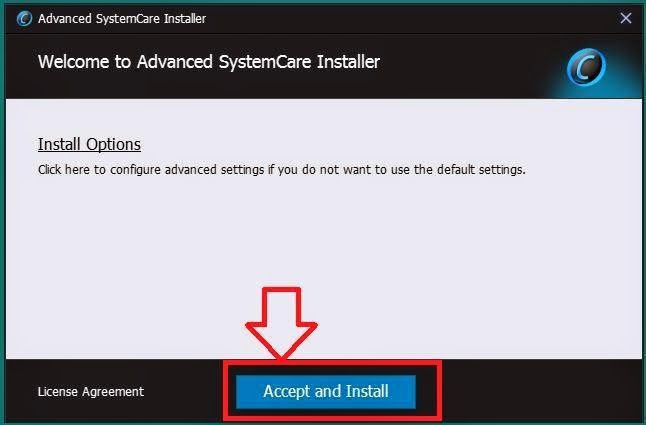
Step 4 Double click on the file and run it. A new window will open (have patient, depending upon your system performance it may take time to arrive), which looks like something below.


Step 5 Click custom install, by default standard installation will be selected. Check/ Uncheck the yahoo, bing, etc. toolbar options, and click install. The screen shot follows. You can select standard install button if you want to install iobit recommended settings.


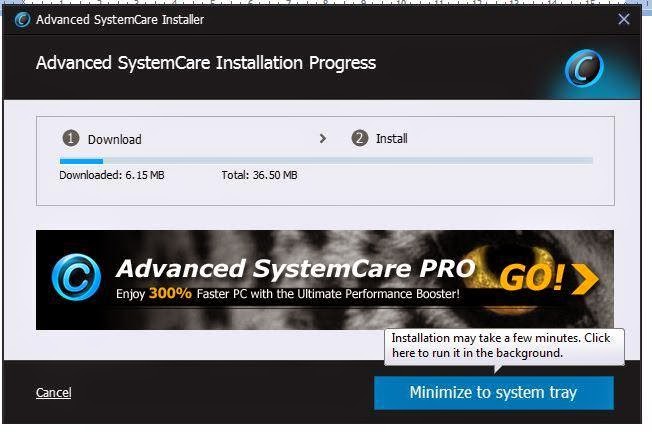
Step 6 It will download the setup and again will take some time to download (Remember your internet speed matters) after successful downloading it will install the software.


Step 7 on the next screen click next or no thanks.


Step 8: on the next window click next, next, next, and on last screen click start now.

Step 9: on the main window, select the options according to your wish and click scan.


The scan feature of Iobit will scan your system for issue and ask you to fix those.

If you want to boost your system's performance like never before , enjoy their premium version by clicking activate now button on main screen on application.