Tech Me More

To quench our thirst of sharing knowledge about our day to day experience & solution to techincal problems we face in our projects.

Advertise with us !
Send us an email at diehardtechy@gmail.com
Showing posts with label Java. Show all posts

Tuesday, January 22, 2019

Java 8: How to check date is valid future date.

Check if a date is a valid future date. 

As a developer we come across many scenarios where we want to validate the user selected date is the correct future date.  

Java 8 provides many useful classes and methods under Date Time API. Below code snippet checks if the date is a valid future date. 


        /**
  * DateTime function which checks for the valid future date.
  * 
  * @author ajain5
  * @param futureDate
  *            : in dd-mm-yyyy or dd/mm/yyyy format
  * @return true if futureDate isAfter currentDate
  */
 public boolean isValidFutureDate(String futureDate) {
  String date[] = futureDate.split("[\\/-]");
  int day = Integer.parseInt(date[0]);
  int month = Integer.parseInt(date[1]);
  int year = Integer.parseInt(date[2]);

  LocalDate today = LocalDate.now();
  return today.isBefore(LocalDate.of(year, month, day));

 }


You can test the above code using below driver program. 


System.out.println(new Ti().isValidFutureDate(args[0]));

Response after running the above program :


Current date : 22-01-2019

The above program was tested on 22-Jan-2019 .

Wednesday, January 3, 2018

What is the best way to check element not present in webpage using selenium webdriver ?


Best Way of checking element not present in webpage using selenium webdriver ?


Often encountered a situation where you have to verify an element is not present in the web page. 

using 


try {

        driver.findElement(locatorKey);

        Assert.assertTrue(false);

    } catch (org.openqa.selenium.NoSuchElementException e) {

        Assert.assertTrue(true);

    }


is not a right approach. Because this is layman way of asserting absence of web element.

As per selenium documantaion, best way to check if element is not present is using findElements and then asseting on the size of the list returned. 

findElements does not throw any exception in case if an element is not present. Asserting on 0 length is more appropriate for absence of an element. 

Selenium official comment : 


Wednesday, April 19, 2017

How to get all the annotated classes of a package with same attribute value?

One of the most common problem when using annotation is to find the classes based upon the attribute value of an annotation. 


Problem-statement: Find all the classes in com.annot package which have @ExampleAnnot annotation and attribute value of author in @ExampleAnnot is dht.

To achieve this we will need the following jars.

1. javassist-3.12.1.GA.jar  which can be Download  from here.

2. org.reflections.0.9.11.jar which can be Download from here


Add both the jar files in your classpath. 


Example code: 


package annot;

import java.util.Set;

import org.reflections.Reflections;
import org.testng.TestListenerAdapter;

public class Lists extends TestListenerAdapter {
 
 public static void main(String[] args) {
  Reflections reflections = new Reflections("com.annot");
  Set<Class<?>> annotated = reflections.getTypesAnnotatedWith(ExampleAnnot.class);
  
  for(Class<?> c:annotated)
  {
   ExampleAnnot declaredAnnotation = c.getDeclaredAnnotation(ExampleAnnot.class);
   if(declaredAnnotation.author().equals("dht"))
   {
    System.out.println(c.getName());
   }
  }
  
 }

}


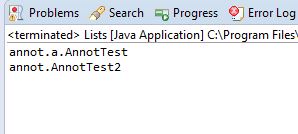
The above example first finds all the classes with @ExampleAnnot annotation, then sequentially checks the author attribute from @ExampleAnnot of each class , and if author value is equal to dht, it prints the well qualified name of all those class.
Above example returns all the classes which have author name as dht. 


Happy coding. Let us know if you are stuck somewhere.


Authorize an user using LDAP authentication in Java.

LDAP authentication is now-a-days very useful for enterprises application. LDAP also acts as source of SSO [Single sign on]. Ldap stands for Lightweight Directory Access Protocol , in this post we are basically trying to authenticate an user using his windows credentials with Java. 


Prerequisite :

1. Java version 1.7 or higher

2. Springs 

3. You need to know your organizations LDAP url ,port number , username and password of manager account or service account.


Spring provides LDAP template which we can use for easy querying of LDAP server.


Below is the example code of LDAP authentication:


package dht.test.ldap.unittest;

import org.springframework.ldap.core.DistinguishedName;
import org.springframework.ldap.core.LdapTemplate;
import org.springframework.ldap.core.support.LdapContextSource;
import org.springframework.ldap.filter.AndFilter;
import org.springframework.ldap.filter.EqualsFilter;


public class LdapTest {

 public static void main(String[] args) throws Exception {

  LdapContextSource contextSource = new LdapContextSource();
  contextSource.setUrl("ldaps://Your-ldap-url-COM:portnum");
  contextSource.setBase("OU=org,DC=corp,DC=die,DC=com");
  contextSource.setUserDn("autoaccount01");
  contextSource.setPassword("We1c0me2ldap");
  contextSource.afterPropertiesSet();

  LdapTemplate ldapTemplate = new LdapTemplate(contextSource);
  ldapTemplate.afterPropertiesSet();

  boolean b = new LdapTest().authenticate(ldapTemplate, "dht3", "Dht@123");
  System.out.println("Authentication " + b);

 }

 public boolean authenticate(LdapTemplate ldapTemplate, String userName, String password) {
  AndFilter filter = new AndFilter();
  filter.and(new EqualsFilter("objectclass", "person")).and(new EqualsFilter("sAMAccountName", userName));
  return ldapTemplate.authenticate(DistinguishedName.EMPTY_PATH, filter.toString(), password);

 }

}


 Above program returns Authentication successful if user has provided valid login credentials, false otherwise. 


Happy coding. Let us know if you get stuck somewhere.


Tuesday, April 18, 2017

Solution: java.lang.AbstractMethodError: org.testng Error


How to solve 


java.lang.AbstractMethodError: org.testng.remote.RemoteTestNG$DelegatingTestRunnerFactory.newTestRunner(Lorg/testng/ISuite;Lorg/testng/xml/XmlTest;Ljava/util/Collection;)Lorg/testng/TestRunner;
    at org.testng.SuiteRunner$ProxyTestRunnerFactory.newTestRunner(SuiteRunner.java:587)
    at org.testng.SuiteRunner.init(SuiteRunner.java:161)
    at org.testng.SuiteRunner.<init>(SuiteRunner.java:114)
    at org.testng.TestNG.createSuiteRunner(TestNG.java:1290)
    at org.testng.TestNG.createSuiteRunners(TestNG.java:1277)
    at org.testng.TestNG.runSuitesLocally(TestNG.java:1131)
    at org.testng.TestNG.run(TestNG.java:1048)
    at org.testng.remote.RemoteTestNG.run(RemoteTestNG.java:115)
    at org.testng.remote.RemoteTestNG.initAndRun(RemoteTestNG.java:207)
    at org.testng.remote.RemoteTestNG.main(RemoteTestNG.java:178)

error ?

This is one of the common issue people face when running testng suites. 

Most common reason is conflicting of testng versions. May be there are 2 versions of testng in your classpath , which are causing this issue.

Check your maven dependency from Build path

[Right click on project-->Build Path -->Configure build path --> Maven dependency and check for testng]

if there are 2 version of testng, delete one. 

This should solve your problem.

If you get stuck somewhere, contact us here : Email