Tech Me More

To quench our thirst of sharing knowledge about our day to day experience & solution to techincal problems we face in our projects.

Advertise with us !
Send us an email at diehardtechy@gmail.com
Showing posts with label fresher. Show all posts

Thursday, July 16, 2015

Java program to validate the PAN card Number : Regular expression

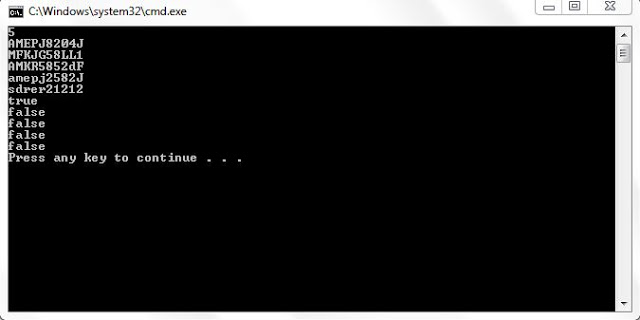
Write a java program to validate a PAN Card number. A PAN card number is said to be valid when it starts with 5 uppercase letters 4 digits and Followed by single upper case letter. A Valid PAN have only 10 letters.

For example: a pan card number AMEPJ2585B is valid where as AM525LDKF is invalid.

Given below is the java program which makes use of regular expressions to validate the PAN number. 

ValidPan.java

import java.util.*;
class ValidPAN 
{
 public static void main(String[] args) 
 {
  Scanner scn=new Scanner(System.in);
  int t=scn.nextInt();
  String s[]=new String[t];
  boolean output[]=new boolean[t];
  for(int i=0; i<s.length;i++)
  {
   s[i]=scn.next();
   boolean ss=s[i].matches("[A-Z]{5}\\d{4}[A-Z]{1}");
   output[i]=ss;
  }
  for(boolean b:output)
  {
   System.out.println(b);
  }


 }
}


Sample Output: 


Monday, July 13, 2015

Java program to convert the number in time format


Given below is the java program to print the time given in number format to String format.

For example: if you give input as 5 45, the below program will print Quarter to six


import java.util.*;
class TimeTest 
{
 public static void main(String[] args) 
 {
  String addString="";
  HashMap<Integer,String> hm=new HashMap<Integer,String>();
  hm.put(1,"one");hm.put(2,"two");hm.put(3,"three");hm.put(4,"four");hm.put(5,"five");
  hm.put(6,"six");hm.put(7,"seven");hm.put(8,"eight");hm.put(9,"nine");hm.put(10,"ten");
  hm.put(11,"eleven");hm.put(12,"twelve");hm.put(13,"thirteen");hm.put(14,"forteen");hm.put(15,"fifteen");
  hm.put(16,"sixteen");hm.put(17,"seventeen");hm.put(18,"eighteen");hm.put(19,"ninteen");hm.put(20,"twenty");
  hm.put(21,"twenty one");hm.put(22,"twenty two");hm.put(23,"twenty three");hm.put(24,"twenty four");hm.put(25,"twenty five");
  hm.put(26,"twenty six");hm.put(27,"twenty seven");hm.put(28,"twenty eight");hm.put(29,"twenty nine");hm.put(30,"thirty");

  Scanner scn=new Scanner(System.in);

  int hour=scn.nextInt();
  int minute=scn.nextInt();

  if(minute==00)
  {
   addString=hm.get(hour)+" o' clock";
  }
  else
   if(minute==15)
  {
   addString="quarter past "+hm.get(hour);
  }
  else
   if(minute==30)
  {
   addString="half past "+hm.get(hour);
  }
  else 
   if(minute>30&&minute==45)
  {
   addString="quarter to "+hm.get(hour+1); 
  }
  else
   if(minute>30&&minute!=45)
  {
   minute=60-minute;
   String midString="minute";
   String min=String.valueOf(minute);
   if(min.length()>1)
   {
    midString="minutes";
   }
   addString=hm.get(minute)+" "+midString+" to "+hm.get(hour+1); 
  }
  
  else
  {
   String midString="minute";
   String min=String.valueOf(minute);
   if(min.length()>1)
   {
    midString="minutes";
   }
   
   addString=hm.get(minute)+" "+midString+" past "+hm.get(hour); 
  }

  System.out.println(addString);

 }
}

Sample output

Tuesday, October 14, 2014

HashSet in collection framework


HashSet

HashSet is the direct subclass of Set interface , HashSet doesn’t allow duplicates element insertion and insertion order is not preserved.

  1.  Underlined data structure is HashTable.
  2. HashSet doesn't allow duplicates.
  3.  Insertion order is not preserved.
  4.  Null insertion is allowed.
  5.  Heterogeneous objects are allowed. 
  6. Implements Serializable and clonable interfaces.

Constructor in HashSet

HashSet hs=new HashSet();  // creates an empty HashSet


HashSet hs=new HashSet(int initialCapacity); 

//Creates and empty HashSet with passed initialCapacity and default load factor 0.75.

HashSet hs=new HashSet(Collection c); 

//Creates a HashSet representation of Passed collection object.

HashSet hs=new HashSet(int initialCapacity, float loadFactor); 

//creates an empty HashSet with given initialCapacity and given loadFactor.

Example:

import java.util.*;
class HashSetDemo 
{
 public static void main(String[] args) 
 {
  HashSet hs=new HashSet();
  hs.add(10);
  hs.add(20);
  hs.add(30);
  hs.add(10);
  hs.add("Hello");
  hs.add(null);
  hs.add(new HashSetDemo());
  System.out.println(hs);
  System.out.println(hs.remove(30)); /*removes the passes argument object from 
           the HashSet and returns true, false otherwise.*/
  System.out.println("Total number of elements in the HashSet "+hs.size());
  hs.clear(); //clear the entire HashSet 
  System.out.println(hs);
  
 }
}

Output:


Tuesday, October 7, 2014

9 Key Interfaces of Collection framework and Collection framework Hierarchy

Collection framework in Java


When we want to represent a group of individual object as a single entity we should choose Collection. 


Difference between Collection and Collections

Collection is an interface, whereas Collections is a class in java. Collection is treated as base interface in Collection framework, whereas Collections class consists exclusively of static methods that operate on or return collections. Collections class is defined in java.util package.


9 Key Interfaces of Collection framework

  • Collection
  • List
  • Set
  • SortedSet
  • NavigableSet
  • Queue
  • Map
  • SortedMap
  • NavigableMap

s       Collection framework Hierarchy


Wednesday, September 17, 2014

LinkedList In Java: A Complete Overview

LinkedList

LinkedList is the subclass of List interface. LinkedList is an implementation of doubly linked list data structure.

LinkedList implements List as well as Serializable, and Clonable interfaces.

Few Important Points About LinkedList

  •  Underlined data structure is doubly linked list . 
  • Heterogeneous data elements are allowed.     
  • Null insertion is allowed. 
  • Duplicates are allowed. 
  • Insertion order is preserved.

     Constructor In ArrayList


LinkedList()
Constructs an empty list.

LinkedList(Collection<? extends E> c)
Constructs a list containing the elements of the specified collection, in the order they are returned by the collection's iterator.


Methods In ArrayList

In addition to methods which are available in List, Collection interface, there are several LinkedList specific methods which you can be used only on LinkedList object.

  • Void addFirst(Object o) //Adds a new node at first place
  • Void addLast(Object o) //Adds a new node at last place
  • Object removeFirst() //remove and return the object at first node
  • Object removeLast() //remove and return the object at last node
  • Object getFirst() //return the object at first node
  • Object getLast() //return the object at last node

//Sample Program For LinkedList

import java.util.*;
class LinkedListDemo
 {
public static void main(String [] args)
{
LinkedList l=new LinkedList();
l.add("10");
l.add("10");
l.add(null);
l.add(1,100);
l.set(1,"DHT");
l.addFirst("10");
System.out.println(l);
}
}

Output of the above program


Scenarios When To Choose LinkedList And When Not To.

LinkedList is best choice when our main function is insertion at middle or deletion from middle. LinkedList could be worst choice if our main function is retrial of data from middle of the List.

More details:


If we want to insert new node at 2 place, we need not to perform shift operation. 


If you want to go to Node 2 of the list , it will first go to node 1 since node 1 has the address of node 2 then it will go to node 2.

Think of the same problem when we have 10 millions elements in the LinkedList and at some point if you want to retrieve some data element at 10000 position, it will have to go through 9999 nodes starting from node 1.

Retrieval of data from the middle of list is a performance violating task in LinkedList.

Read about ArrayList here